AutoCount Overview
Complete Business Software for Accounting, Inventory, POS, Payroll and e-Invoice
Learn what AutoCount is, how it helps Malaysian businesses manage accounting, inventory, invoicing, POS, payroll and e-Invoice compliance in one integrated system.
AutoCount Overview
AutoCount is a popular business software solution in Malaysia designed to help companies manage accounting, invoicing, inventory, sales, purchasing, POS, payroll, HRMS and e-Invoice processes more efficiently. It is widely used by SMEs that want a reliable system to reduce manual work, improve accuracy and gain better control over daily business operations.
Instead of managing accounts, stock, sales and reports separately, AutoCount allows businesses to centralise important business data in one system. This helps business owners, accountants and admin teams work faster, reduce errors and make better decisions based on updated information.
AutoCount offers solutions for accounting, Cloud POS, HRMS and LHDN e-Invoice support, making it suitable for Malaysian businesses that want a more structured and compliant system.
What is AutoCount ?
AutoCount is a business management software developed to support daily business operations such as:
Accounting and bookkeeping
Sales invoice and billing
Purchase order and supplier management
Inventory and stock control
Customer and supplier records
Financial reporting
POS system for retail and F&B
Payroll and HRMS
LHDN e-Invoice related processes
For many SMEs, AutoCount is more than just accounting software. It can become a complete business system that connects finance, stock, sales and management reports together.
Why Businesses Use AutoCount
Many growing businesses face common problems such as inaccurate stock records, delayed invoices, manual reporting, repeated data entry and difficulty tracking business performance. AutoCount helps solve these issues by providing a more organised and integrated workflow.
With AutoCount, sales transactions, purchase documents, inventory movement and accounting entries can be linked together. This reduces duplicate work and helps businesses maintain cleaner records.
AutoCount is also designed for SMEs, with solutions covering accounting, POS, HRMS, inventory and e-Invoice needs.
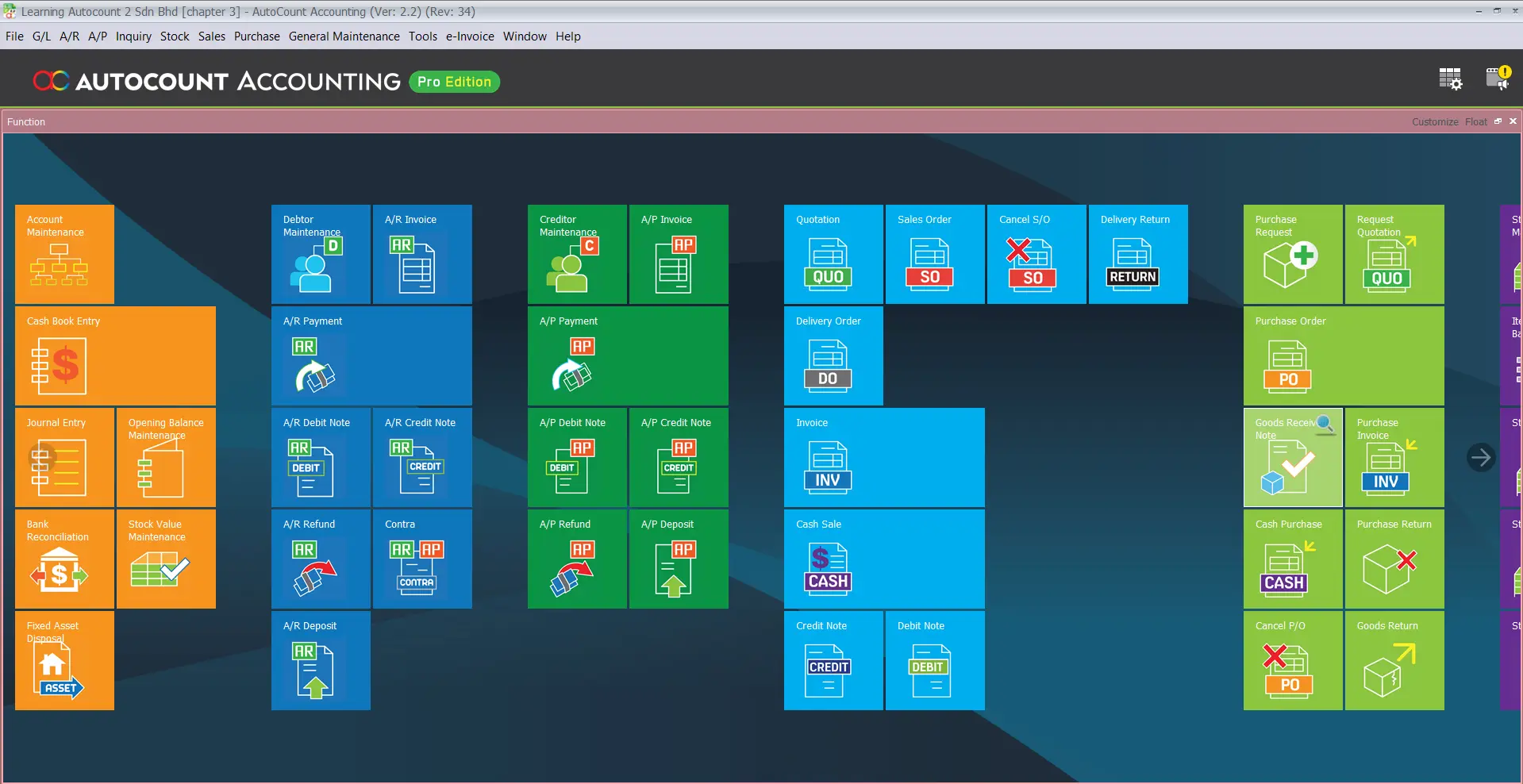
Key Features of AutoCount
Accounting Management
Manage general ledger, accounts receivable, accounts payable, journal entries, bank reconciliation and financial reports such as Profit & Loss, Balance Sheet and Trial Balance.
Invoicing and Billing
Create quotations, sales orders, delivery orders, invoices, credit notes and debit notes quickly and accurately.
Inventory and Stock Control
Track stock quantity, stock movement, item costing, warehouse balance and inventory value more efficiently.
Purchasing and Supplier Management
Manage purchase orders, goods received notes, supplier invoices and supplier payment records in one system.
POS System
Support retail and F&B businesses with cashier sales, product pricing, promotions, stock updates and sales reports.
Payroll and HRMS
Handle employee records, payroll, leave, claims and attendance management more systematically.
e-Invoice Support
Help Malaysian businesses prepare for LHDN e-Invoice submission and digital tax compliance.
Benefits of Using AutoCount
Improve Business Efficiency
AutoCount helps reduce repeated manual work by connecting different business processes. Once information is entered into the system, it can flow into related documents and reports.
Reduce Human Error
Manual bookkeeping and spreadsheet tracking can easily lead to mistakes. AutoCount helps improve accuracy by using a structured system for accounting, inventory and invoicing.
Better Financial Visibility
Business owners can view important reports to understand sales, profit, expenses, debtors, creditors and stock value.
Easier Compliance
AutoCount supports Malaysian business requirements such as SST and e-Invoice related processes, depending on the version and setup used.
Scalable for Business Growth
Businesses can start with the modules they need and expand when operations become more complex. This makes AutoCount suitable for companies at different growth stages.
AutoCount for Malaysian SMEs
For Malaysian SMEs, having a reliable accounting and business system is no longer optional. As business operations become more digital and compliance requirements increase, companies need software that can support accurate records, faster reporting and better workflow control.
AutoCount is commonly chosen by SMEs because it offers practical functions for local business needs, including accounting, inventory, POS, payroll and e-Invoice support. Its flexibility makes it suitable for companies that want to move away from manual records and build a more organised system.
Why Choose AutoCount Instead of Manual Accounting?
Manual accounting may work for very small businesses at the beginning, but it becomes risky as transaction volume increases. Common issues include missing invoices, wrong stock balances, slow report preparation and difficulty tracking customer payments.
AutoCount helps businesses overcome these challenges by providing:
- Centralised business records
- Faster document preparation
- More accurate stock tracking
- Easier financial reporting
- Better control over debtors and creditors
- Stronger audit trail
- Improved business decision-making
For growing companies, using proper accounting software can save time and reduce costly mistakes.
Conclusion
AutoCount is a powerful and flexible business software solution for Malaysian SMEs that want to manage accounting, invoicing, inventory, POS, payroll and e-Invoice processes more efficiently. It helps businesses reduce manual work, improve accuracy, strengthen compliance and gain better visibility over daily operations.
Whether you are upgrading from spreadsheets, replacing an old accounting system or preparing for Malaysia e-Invoice implementation, AutoCount can provide a more reliable foundation for your business growth.
Frequently Asked Questions
Who is AutoCount suitable for?
AutoCount is suitable for SMEs, retail shops, wholesalers, distributors, service companies, F&B businesses and companies that need better control over accounts and stock.
Can AutoCount help with inventory management?
Yes. AutoCount can help businesses track stock quantity, stock movement, item costing, warehouse balance and inventory reports.
Is AutoCount suitable for small businesses?
Yes. AutoCount is suitable for small and medium businesses because it can be set up according to different business needs and budgets.
Install Autocount Accounting Software in 3 Easy Steps
Get started with Autocount today!
Download the latest version of Autocount and follow our simple installation guide to set up your software. Whether you’re a first-time user or updating to the latest version, the process is quick and straightforward.
Get Free Consultation Contact Us Today